
Investor Details Tab#
The Tab: Investor Details tab provides comprehensive information about the selected investor, including personal information, contact details, and investment preferences.
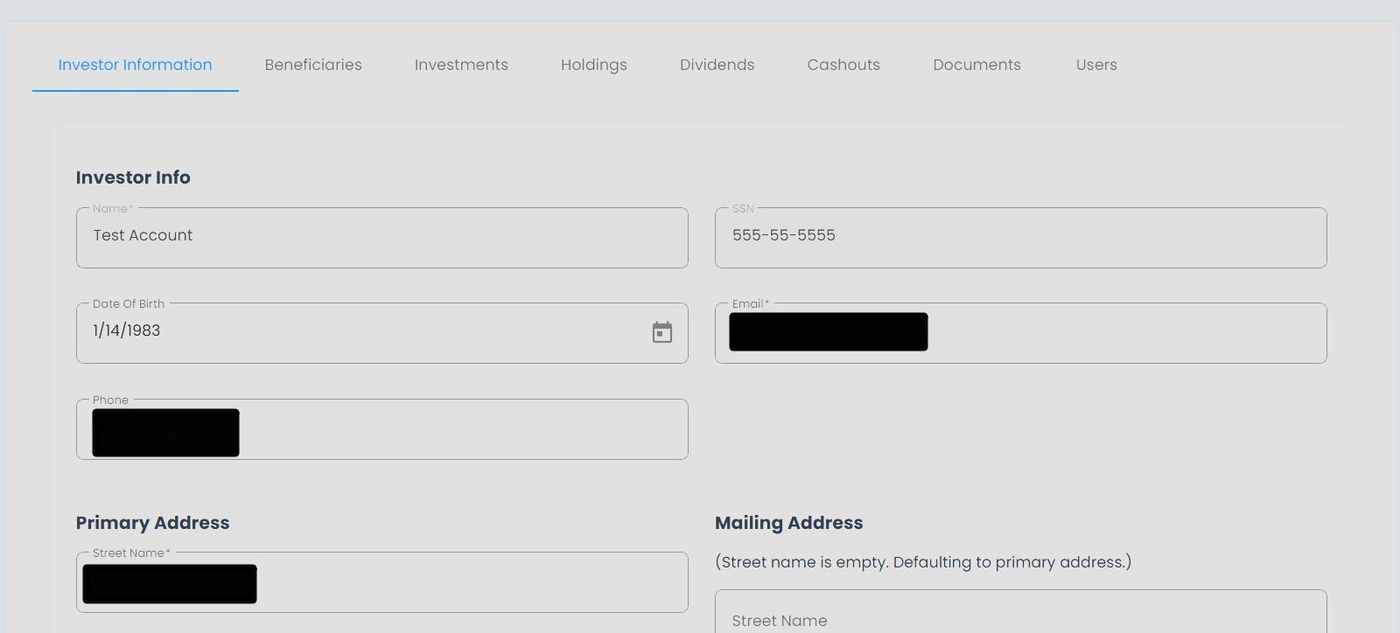
Investor Details Tab Location#
Required Fields
Required fields are marked with a red asterisk (*) and cannot be left blank
Optional fields can be completed based on investor preferences
Investor Information Section#
The Section: Investor Information section allows you to edit the investor’s personal information. It’s split into three distinct sections:
Required field: Investor Info
Required field: Primary Address
Optional field: Mailing Address
Investor Information Section Overview#
Available Information#
The Investor Details tab displays the following information categories:
Personal Information#
The Subsection: Personal Information displays:
Full Legal Name
Date of Birth
Social Security Number/Tax ID
Primary and Mailing Address#
See Primary and Mailing Address section for details.
To Edit an Investor’s Details:
Place your cursor in the field you want to edit.
Note
This section does not require you to click the Edit button.
Type the changes you want to make.
Action: Click the Action: Save Changes button at the bottom-right of the page.
Save Changes Location
The Save Changes button is located at the bottom-right corner of the Investor Details form.
Note
Some investor information may require additional verification before changes take effect.