
Email Template Style Tab#
The Section: Email Template Style Tab section explains how to customize the appearance and formatting of email templates.
Location
Settings > Email Templates > Style Tab
Overview: Style Tab#
The Style Tab provides tools to modify the visual elements of email templates, including fonts, colors, spacing, and other design aspects. These tools help ensure that your email communications have a professional and consistent appearance.
Accessing the Style Tab#
The Style Tab can be accessed from the email template editor interface.
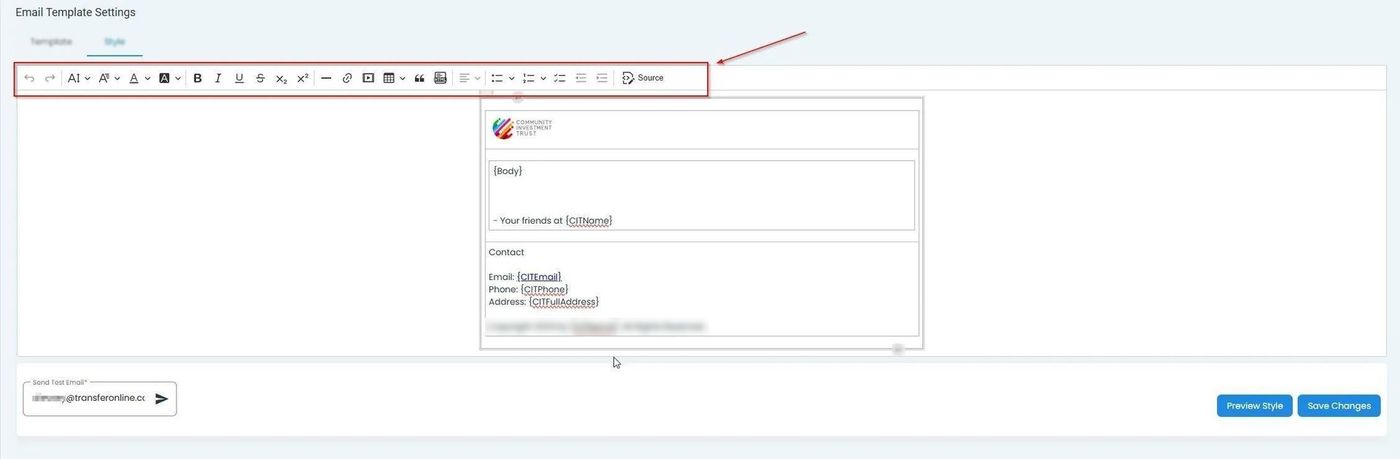
Location of the Style Tab in the email template editor#
Style Options#
The Style Tab offers various customization options for email templates.
Font Customization#
Configure font properties such as typeface, size, weight, and color.