
Complete Transactions#
The Section: Complete Transactions section provides access to all completed transaction records in the system.
Overview#
The Section: Complete Transactions section displays all transactions that have been successfully processed and completed.
Complete Transactions Homepage Location#
To Find the Complete Transactions List Homepage:
Locate the primary sidenav to the left of the page.
Don’t see the sidenav?
See How to Toggle Primary Sidebar for more information.
Select the dropdown for the Transaction category.
Select Section: Complete Transactions from the dropdown.
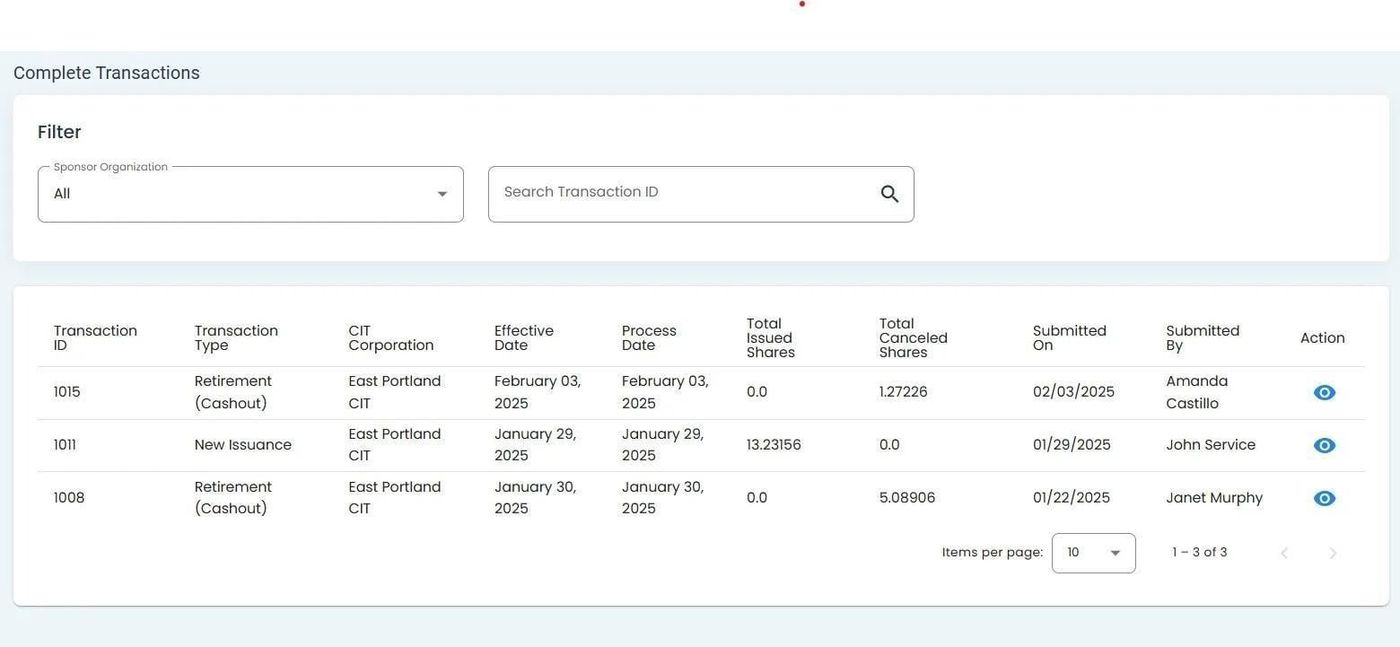
Complete Transactions Homepage Location#
Complete Transactions List Table#
The Table: Complete Transactions List table displays all completed transaction records.
Complete Transactions List Table#
Columns: Complete Transactions List Table#
The Column: Columns for the Table: Complete Transactions List table can be found at the top of the table:
Column: Transaction ID - The unique identifier for the transaction.
Column: Date - The date the transaction occurred.
Column: Investor - The investor associated with the transaction.
Column: Organization - The organisation associated with the transaction.
Column: Amount - The value of the transaction.
Column: Transaction Type - The category of the transaction.
Column: Status - The current processing status.
Column: Action - Actions that can be performed on the transaction.