
Enrollment Status Legend#
The Table: Enrollments table uses color-coded statuses to categorize enrollments. You can find a legend for these statuses on the front page:
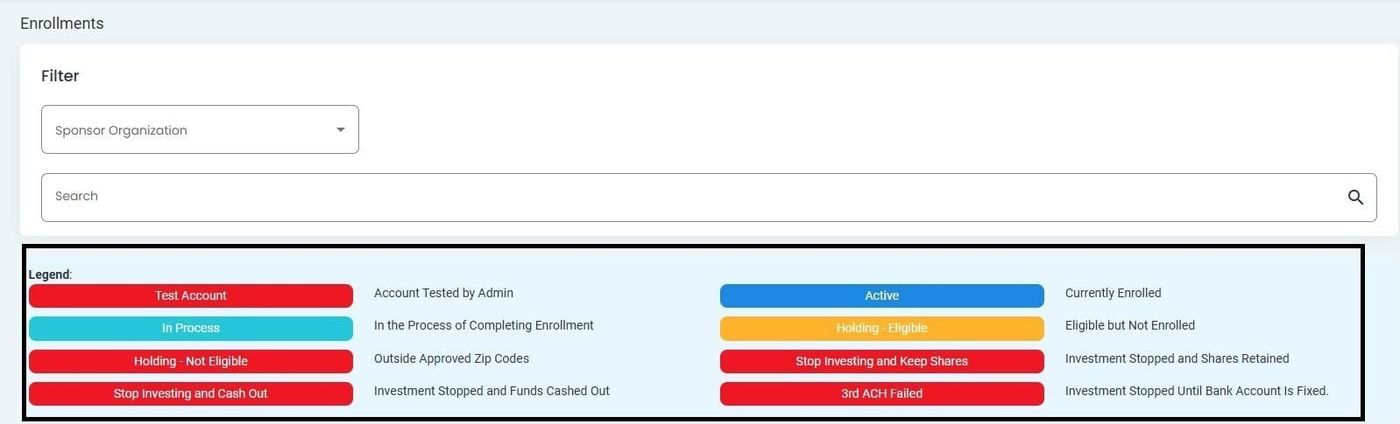
Enrollments Table Legend#
Enrollment Status Definitions#
The Table: Enrollments table can display any Option: Investors with any of the following statuses:
Status: Active - Investor is currently enrolled and actively participating in the offering.
Status: Pending - Enrollment application is awaiting review and approval.
Status: Approved - Enrollment has been approved but not yet activated.
Status: Rejected - Enrollment application was not approved.
Status: Suspended - Enrollment has been temporarily suspended.
Status: Inactive - Investor enrollment has been deactivated or terminated.
Status: Expired - Enrollment period has ended and is no longer valid.